
Same email batch only sends once per respondent
When you make a sendout from Distribute → Show Messages, the email is normally only sent to participants who have not already received that specific sendout. This means that the same email batch as a rule does not send the same email twice to the same respondent. If you send the same sendout again later, it is therefore only new participants who may be included. The exception is if you go to Distribute → Participants, select one or more specific participants, and send manually again. In that case, the same person can receive the sendout again.
Schedule reminders
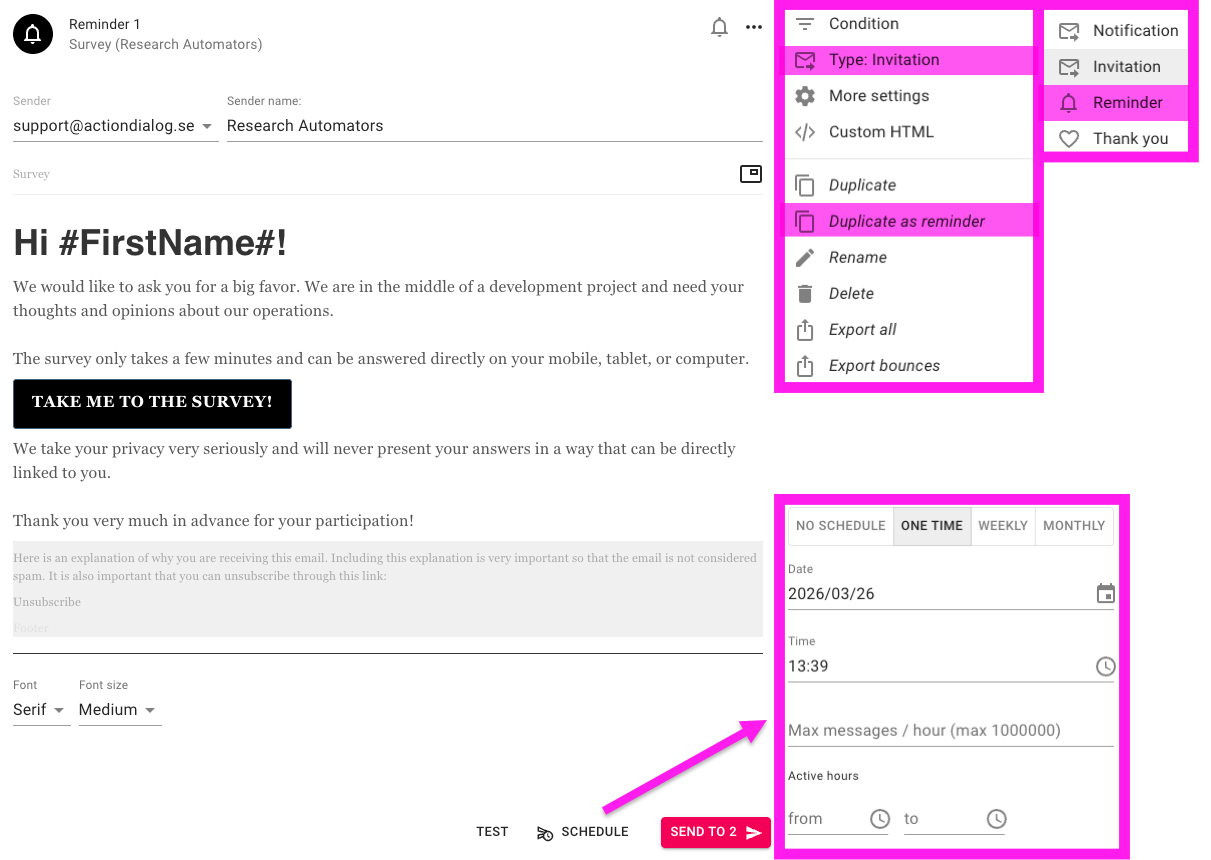
To create a reminder: click on the three dots on an existing sendout and choose Duplicate as reminder, or to change an existing sendout choose Type: Invitation → Reminder. When the sendout is set as a reminder, it is shown with a bell icon, so that it is clear that it is a reminder.
A reminder is only sent to participants who have not yet completed the survey. Participants with status Completed are therefore not included in the reminder.
To schedule the sendout, click SCHEDULE at the bottom of the sendout. There you can choose how the reminder should be sent: One time, Weekly or Monthly. In the same view you set date, time, and other settings for when the sendout should go out.
Scheduling of weekly and monthly sendouts
When a sendout is scheduled as Weekly or Monthly, it runs repeatedly according to the interval you have chosen. This means that the same sendout is not only sent at a single occasion, but that the system continues to run it according to the schedule until you change or stop it.
At each scheduled run, it is checked which participants should be included at that time. For reminders, this means that the sendout is only sent to participants who still have not completed the survey. Participants with status Completed therefore do not receive the reminder, even if the sendout continues to run every week or month.
Automatic sendouts in rolling projects
In rolling projects where new respondents are added continuously, scheduled sendouts work well since the system checks the participant list at each run. This means that new participants who have been added since the previous run can receive the sendout when the next scheduled occasion occurs.
Since the same sendout normally is only sent once per respondent, duplicate sends are avoided, while new participants are continuously captured by the schedule.
Email statuses in Survey Automator
Email statuses show what has happened with the sendout or how far the respondent has come in the survey.
● Completed
The respondent has filled in the survey and finished it
● Started
The respondent has started the survey but not finished it
● Opened
The respondent has opened the email but not started the survey
● Received
The email has reached the respondent, but the link has not been opened
● Soft bounce
The email could not be delivered right now, but it may still be possible at a later time
● Spam (soft bounce)
The domain used for the sendout has been flagged as spam and received a worsened domain reputation
● Unreg
The respondent has chosen not to receive more emails
● Hard bounce
The email could not be delivered due to a permanent error and will normally not be delivered in new attempts, for example if the address does not exist. This status can sometimes be set already before sending through automatic bounce checks. The system saves hard bounce status and normally does not try to send again, since repeated attempts can damage the sender domain’s email reputation. If you still need to send again, the participant can be included again via Include
● Invalid
The email address is invalid. This status is flagged in the system before the sendout is made
For more information about a specific sendout, you can open a respondent and go to … → Delivery logs.
FAQ
Need a faster way to turn results into reports?
See real examples — browse our PowerPoint report templates and find a style that fits your project!